
Today I want to talk about some of the best apps I’ve found for learning Japanese. All of these are on the Google Play Store, but most are also available on Apple’s App Store. You can even get a few on Windows phones. They’re all free to download; some have paid upgrades, but I only use the free version.
I’ve also included a few popular apps that I can’t quite recommend, but wanted to include my thoughts on them anyway.
Without further ado, let’s get this show on the road.
Recommended Apps
LingoDeer
Category: Vocab/Grammar – Availability: Google Play, App Store
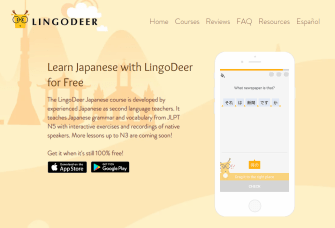 LingoDeer is aimed mostly at beginning-level Japanese learners. Relative to the other entries on this list, I’ve discovered LingoDeer relatively recently. I actually really like it, though!
I’d mostly compare it to DuoLingo (further down on this list), which I’ve tried in the past, or Rosetta Stone (only LingoDeer is free). I like it better than either of those, personally. Right now it only has courses for JLPT N5-level learners (read: beginners), but they’re supposedly working on developing content for learners up to level N3 (intermediate).
It’s one of those formats where you learn different vocab categories (e.g. Nationality, Profession, Weather, Age, Time, Family, etc.) and work your way up a tree. You can test out of the various blocks if you already feel comfortable with everything in them, too. Practice at your own pace; study in big chunks, or just meet daily goals.
Overall, if you like the learning format in this type of app, LingoDeer’s the best of its kind right now.
WaniKani
Category: Kanji/Vocab – Availability: Google Play (unofficial app)
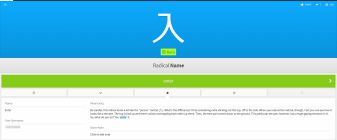 Let me preface this by saying WaniKani is technically only free for the first three levels… and it goes up to level sixty. You learn a lot in just those first three levels, though; each level takes roughly a week, if you’re diligent.
WaniKani is a website in the Tofugu family designed to help you learn over 2000 kanji 漢字 through the use of mnemonics. It also teaches you radicals, which are sort of the building blocks which make up various kanji. You learn meanings and readings for all the kanji as you go.
The full version comes at a price, but if you aren’t flat broke like me, it’s a good investment. I’m trying to save up for a WaniKani lifetime membership. At the time of this writing, the current regular prices are $9/month, $89/year, or $299/lifetime. Around the New Year, though, WaniKani has historically gone on mega sale for half-off yearly and lifetime. There’s also (usually) another discount code floating about, but even if you can find it, I’m not sure it’s as good as the New Year sale. I don’t know what the current one is; they tend to put one out for awhile, then discontinue it. I believe we’re currently in a lull between codes. Either way, if you don’t like it or it doesn’t work for you, there’s plenty of free content to help you decide.
Despite this, as I said, even just the first three levels give you a bunch of good info. You can find similar techniques through things like Remembering the Kanji, but books don’t come with the same advantages. Don’t get me wrong, I still like books — probably a lot more than most people, really. But it’s a lot easier to remember to study when I get a notification on my phone telling me it’s time, and better yet when the app will remember which kanji I’m having trouble with and which I don’t need to study anymore. WaniKani has an algorithm — a spaced repetition system — that judges which kanji to quiz you on each time, and judging by the first few levels alone, it works.
For some bizarre reason, there doesn’t seem to be an official app for either Apple or Android. There’s a (bad, unofficial) companion app listed on the Microsoft Store, but I’m not even going to link to it because its reviews are garbage. Thankfully, some kind soul was nice enough to make an unofficial one for the Google Play Store, so you can access all that WaniKani goodness easily, complete with daily reminders to study.
Kanji Study
Category: Kanji/Kana/Vocab – Availability: Google Play, App Store
 Kanji Study is really handy for kanji lookup. This is what makes it stand out; while something like WaniKani will help you memorize kanji and radicals using mnemonics, Kanji Study helps you with finding a particular character’s meaning and words it commonly appears in.
Another strong point in its favor is that it shows you stroke order. This is a concept that’s hard to grasp for a lot of novice kanji learners. I’ve read a few guides to stroke order over the years, and it’s still something I get wrong a lot of the time because I don’t have the rules memorized yet. Kanji can get very complex (there’s a rare-use one that looks like 靈 and 覺 smushed together side-by-side into one which apparently means the same thing as sei 性 “nature [of a person]”) so stroke order can be a useful factor in keeping things straight from memory.
You can study and search by radicals as well, which is another helpful way to keep things straight in your head. I don’t know every radical yet, but I find myself searching for kanji by the radicals I do know. It’s hard for me to remember a whole kanji at this point, but I can be like, “oh, that one has something that looked like ‘sun’ 日 and ‘tree’ 木 in it,” and even if I can’t remember the rest, I can still pull up 楽 like in the image above by putting in those radicals.
While its primary focus is obviously kanji (it’s in the name), I have picked up a bit of vocab from its suggestions, too. Another cool thing that I’ve found it useful for is that it lists names that the kanji you’re looking up appears in. I’ve been using it to research name ideas for characters in a game I’m working on. I like sneaking symbolism into names, so I would work in kanji with certain meanings when choosing names. (This also lead me to discover a concept called ateji 当て字 “called-upon characters”, which I plan to write about another day.)
It also has some study options available for kana and kanji. You can get daily reminder notifications to help you remember to study.
There is an upgrade available for “advanced kanji” for $15, but you probably won’t need it much at the beginner or intermediate levels. The free version alone gives you a lot of helpful info, and it’s worth having around just for all the stuff it does have.
Tae Kim’s Guide to Learning Japanese
Category: Grammar/Kana/Vocab – Availability: Google Play, App Store
 Tae Kim’s Guide is one of the most useful Japanese resources I’ve seen, no matter where you find it. Not only are there the website and the apps, but there’s also a physical book available if you prefer a non-digital medium. Note that everything available in the book is online for free, so this is really only worth it if you love having things in book form.
This is virtually a textbook in terms of what it has. I haven’t gotten through all of the information yet, but it has lessons on everything from verb conjugations to sentence structure. It also has basic lessons on things like hiragana ひらがな and katakana カタカナ, complete with stroke order and pronunciations.
When it comes to grammar, there’s a wealth of information in this guide, and the digital guide is free. I highly recommend checking it out.
Takoboto
Category: Dictionary – Availability: Google Play, Microsoft Store
 If you’d have asked me a few weeks ago, I’d have recommended Akebi in this spot. Both are available on Android, neither are available on the App Store, and Takoboto is available for Windows phones. While Akebi is a solid dictionary choice, I’d say Takoboto has crept just slightly past as my favorite recently. They’re quite similar in functionality, and both are very good. You may very well prefer Akebi, to be honest, but I figured putting both on here would be redundant, and Takoboto edged it out.
Why? A minor reason is the way definitions come up (in a list, as opposed to tiles like Akebi), but what sold it for me is that it links its kanji to the Kanji Study app. For the reasons listed above, I happen to really like that app, lol. Akebi is self-contained and still shows things like stroke order, but it’s static and I just find Kanji Study’s entries more robust.
You may still want to compare these two and decide for yourself, as I feel a lot of my decision is based on aesthetics and connectivity with another app, and even then it’s close. Both are great. I personally favor Takoboto.
HelloTalk
Category: Speaking partners – Availability: Google Play, App Store
 I talked about HelloTalk the other day in my post about finding a Japanese speaking partner. You can read a little more about it there, but I’ll give you the tl;dr here.
HelloTalk is an app that allows you to connect with native Japanese speakers who are often also trying to learn English.
What I like best about it though is its Moments feature, which is like a micro-blog, sort of. If you type posts in Japanese, native speakers can correct any mistakes you might make; you can help them in return by fixing their posts in English. This helps you see what you’re doing wrong.
Like I said though, it’s intended to help you find people to have regular conversations with. It’s really good for immersion to have a Japanese buddy to talk to, and HelloTalk does open up that door for you. I personally had a lot more luck getting short interactions than extended ones, but even those short interactions are useful. If you’re more outgoing than I am and have no problem initiating conversations, it shouldn’t be too tough to find a regular Japanese speaking partner through HelloTalk.
Your Mileage May Vary
Memrise
Category: Primarily Vocab/Grammar; includes user-created courses – Availability: Google Play, App Store, Microsoft Store
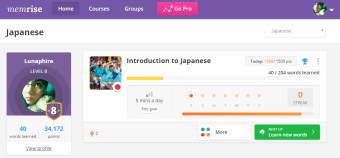 Memrise is interesting in that it has user-created courses in addition to the ones by Memrise itself. Your experience may vary based on which lessons you choose to take, but so far I haven’t found a bad one.
It can get super annoying about nagging you to join Premium, though, and there is some walled-off content. It’s still nice to mess around with the free lessons, though, and you can still learn some things.
I mostly recommend this one; at least to try it out and see if you find something you like. A lot of people love Memrise, but I feel like I have yet to find something on Memrise that holds my interest as well as the apps above do. Put it this way: when I actually remember I have it, I have a pleasant experience using it. Good, but not what I would call great.
DuoLingo
Category: Vocab/Grammar – Availability: Google Play, App Store, Microsoft Store
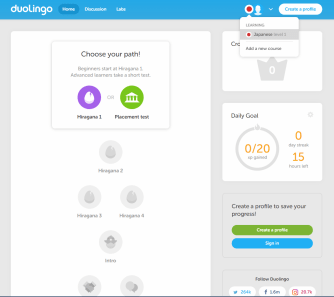 This is probably the second most famous app on this list. DuoLingo is a popular language learning app. I used to use it to brush up on my Spanish, and like many people, I was hyped when the Japanese course finally dropped.
Well, it works about the same way LingoDeer does, as I described above. Before LingoDeer came out, I felt DuoLingo did a fair job of teaching Japanese. I made it through almost the entire tree, actually, but I just feel like LingoDeer does it better. I went back and forth about putting Duo on this list, but in the end, I thought I should still include it because it is free, but with the caveat that I believe that LingoDeer is better for Japanese, and most people seem to agree. If you hate LingoDeer for some reason, maybe see if you like DuoLingo any better.
DuoLingo’s Japanese course has a big problem with incomplete lessons. I think they try to teach it the same way as their other languages, and it feels like they leave out a lot of information going into each lesson. They don’t really define vocab beforehand, nor kanji. I’m not sure if this is a weird bug with just the app, or what. They also have a habit of making you write the same sentence again and again until the progress bar fills all the way.
I feel like it did help me some with very basic Japanese. It focuses a lot more on vocab than grammar, though, so you hit a wall pretty quickly since you can’t form complex sentences. 90% of the way down the tree, they still have me on sentences like, “Please show me a picture of your child,” which basically breaks down to, “child’s picture, show please.” And it’s not like I had only a passing encounter with Duo. There was a point where I had over a hundred-day streak, and the only reason I broke it was because I was hospitalized for almost two weeks. I’m not nearly as far in LingoDeer yet, but I already feel it’s just… better. It lacks Duo’s weaknesses.
The one thing I like about Duo that LingoDeer doesn’t seem to have (or at least I haven’t found it yet) is a comment section for each exercise. This often turns into people meme-ing on Duo’s weird sentence choices (I seem to remember something about a dog selling hats…?), but just as often you’ll find people who know more than you giving tips.
Bottom line, if you want something similar to LingoDeer that’s also free, but isn’t LingoDeer, you might want to give DuoLingo a go.
Rosetta Stone
Category: Vocab – Availability: Google Play, App Store, Microsoft Store
 Ah… Rosetta Stone. The program known by language-learners everywhere. This is likely one of the first language apps you heard of when you started looking. You can try their app for free, though you quickly reach a point where you need to pay. For a good, unique program, such as WaniKani, this isn’t necessarily bad.
But is Rosetta Stone worth it?
In my opinion, no. I’m just gonna say it, no — I don’t think Rosetta Stone is worth the money. For what little you can get for free, I wouldn’t even bother downloading the app. You can learn just as much through LingoDeer, and the functions that LingoDeer doesn’t address can be covered by the other apps on this list.
A Rosetta Stone subscription isn’t cheap, and from what I recall, they actually used to be even worse. Unless you’re like, top-hat-and-monocle rich, I honestly don’t think Rosetta Stone gives you a fair value. Even their paid content is kinda “meh” from what little I’ve seen, and you won’t see much unless you drop the big bucks; it’s $60 for their three-month sub, and their “best deal” two-year sub is $180. They try to make this look like a steal — after all, you’re getting two whole years for the price of nine months, right? Never mind the fact that the three-month price is grossly inflated to begin with.
This review on Tofugu is almost ten years old, but while the alternatives they recommend are outdated, the assessment of Rosetta Stone’s approach to their program is still dead-on. I agree with pretty much all of it.
Just go with the other stuff on this list, especially when we’re talking about free content only.
Anything I’ve left out? I may add Anki at some point as I’m lacking an entry in the flashcard category, but I don’t have enough experience with it yet to call it one of the best. I know it’s versatile, but I’m not sure how well-paced its content is as it seems to be largely dependent on its users. Maybe under YMMV?
What are your favorite Japanese study apps? I’m always looking for good ones!
 Lunaphire